Help Center - Email Settings (SMTP)
Email Settings (SMTP)
Sending Emails with Smart Report Organizer
To enable email functionality in Smart Report Organizer, you must configure the SMTP server settings with username and password authentication.
Here's how to set it up:
- Open the main window of Smart Report Organizer.
- Select [Settings] from the menu.
-
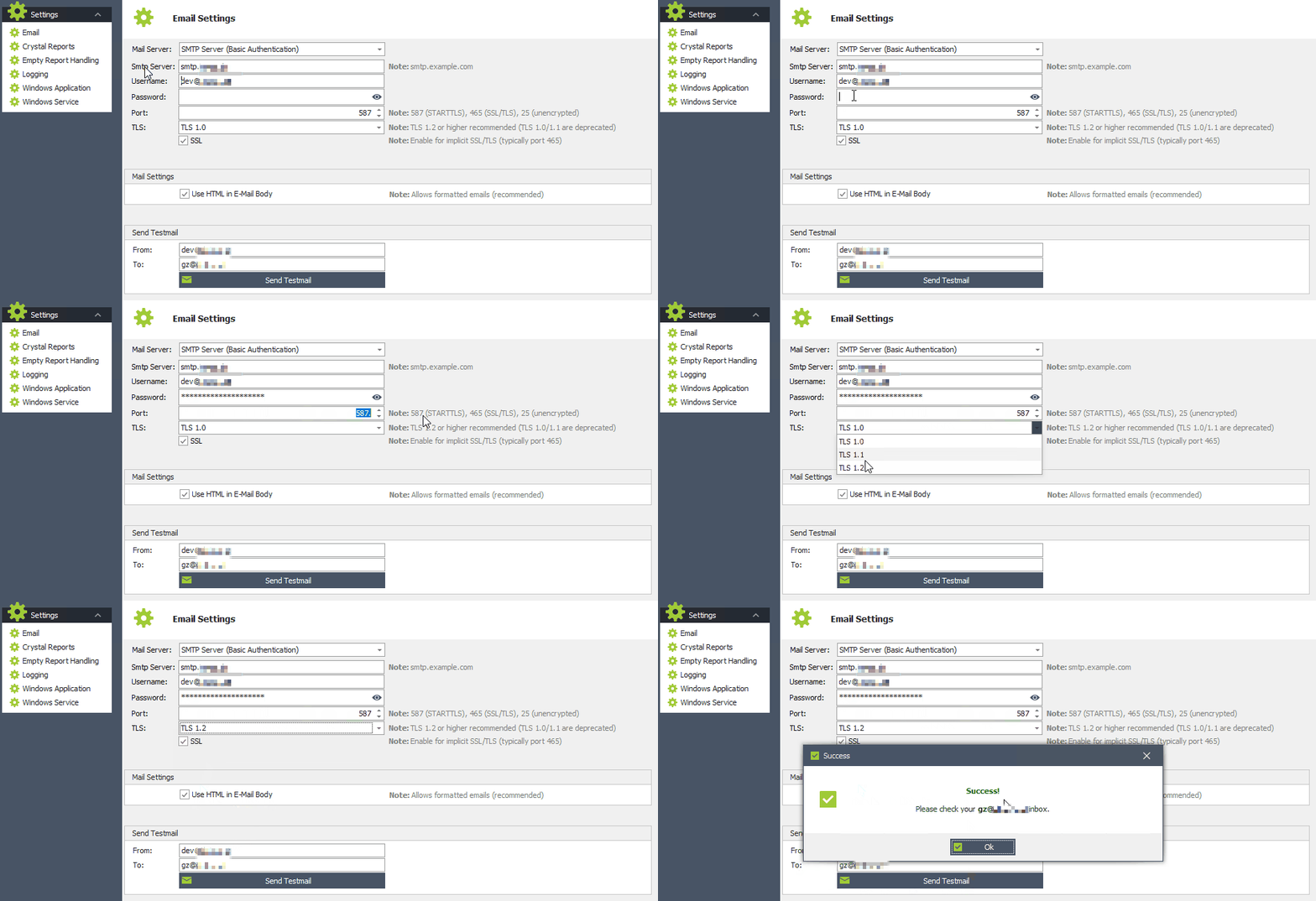
Email Settings:
- Mail Server: 'SMTP Server (Basic Authentication)'
- Smtp Server: Enter your stmp server name. (e.g., smtp.chello.at)
- Username: Enter your username. (e.g. your email address)
- Password: Enter your password.
- Port: Enter your port. (e.g. 587 (STARTTLS), 465 (SSL/TLS), 25 (unencrypted)
- TLS: Activate TLS 1.2 if supported by your SMTP service.
- SSL: Activate SSL if supported by your SMTP service.
-
Email Settings:
- Activate 'Use HTML in E-Mail Body' if desired.
-
Send Testmail:
-
Enter a sender address [From:] and a recipient address [To:] and then click on [Send Testmail...] to check your settings.
If your settings are correct, you should then receive a test email.
-
Enter a sender address [From:] and a recipient address [To:] and then click on [Send Testmail...] to check your settings.
Once you've entered these settings, you'll be able to send emails from Smart Report Organizer using your configured SMTP server.
Example:
Problems sending emails: Most but not all emails are sent?
- Note that the stored SMTP mail server or mail service (e.g. Office 365) uses certain rules that prevent large numbers of emails from being sent. Example: Office365 has the restriction that only 30 e-mails can be sent per minute. There are other restrictions that can be different for each SMTP server.
Please note:
SRO requires an SMTP server with username and password authentication to send emails.
A working SMTP server, valid credentials, and the correct configuration must be provided by your IT infrastructure.
SRO has no control over the restrictions, policies, or limitations of your SMTP service.
If you are unsure about your settings or experience issues, please contact your system administrator or IT department.
